Thursday, December 04, 2008

STARS at East Vincent

We having been have a wonderful learning experience together during our STARS time. The students have engaged in a variety of experiences to develop their reading, writing, research, and oral expressions skills. One project, The Best Book Poll, asked students to select their favorite book and to create a short oral commercial which included important story elements along with their reason why their book was the best. Each student created a podcast of their commercial using an iPod and TuneTalk microphone. Our next step is to ask other students to listen to the podcasts and vote for their favorite book.

Maybe you heard about our “All for One, One for All” project which was the November task for Voices of the World, a collaborative global project. Together we explored the theme of working together through read-alouds, independent reading, and through the creation of a short video which included our visual interpretation of the theme.

Have you heard about Morpheus Fortuna? He has been the focus of our current project. He is visiting our class, learning all about East Vincent, and experiencing all sorts of fun activities. Each student is writing about his experiences all over the school from the point of view of Morpheus Fortuna. In addition, we are taking photos of him to document all of the fun he is having.

An important part of learning is also sharing what you have learned with others. Our podcasts are ready to share with other students. Our writings about Morpheus Fortuna are ready to be shared through his blog. Helping to prepare our students for their futures in a globally flattening world is an important goal. With your permission, I would like to post their work and creations from our classroom projects online linked through my class website, LearningHub.wikispaces.com.

Online Safety

Learning to interact safely online is vital to your child’s work both at school and at home. Throughout our projects, we will address and emphasize the issue and continue to infuse online safety with every online opportunity. Please note that no personal information about your child or photos of your child will be shared online. Students will create their online pseudonym (alias) as their online identify. In addition, each student will create an avatar (a personal icon that is not their picture) for their online presence.

Tuesday, November 18, 2008

Afternoon Tech Rotation Part 1: Google Maps, Earth and SketchUp

Google Maps, Earth and SketchUp presented by Thomas Cooper

Tools that Talk to Each OtherBlurred out image of the Royal Stables in The ...
How could you use these tools?
Google Apps- preschoolers learning their address and then find it on Google Earth
Lower School - Research explorers and then posted text into Google Maps
Middle School - Bought 30 GPS units from Garmin. Plotted out a scavenger hunt at the zoo (3 different paths) and students
used the tool to calculate mathematical questions- shortest route/ route that does not make you repeat any site visited

Google Maps
Go to My Maps and then click on Measuring Tool

Google Earth Pro

Email geec@google .com If you are interested in a Google Pro grant.
Back and forth questions and answers to verify that you actually need
Handles GPS data and also contains MovieMaker which enables you to animate tours
Measuring Tools provide the polygon and circle additionally to measure the distance and area. Using the polygon, you can draw any path that you want and determine distance which will enable you to compare alternate paths.

Collaboration and Google Earth
How can we use Google Earth to post collaborative tools online?
To write code on Google Earth look for the KLM Handbook on Amazon.

SketchUp
Major undate has just been launched- SketchUp version 7
When in Rome...Teach!
Competition just launched for teachers to build curriculum about this layer- Deadline February 2009
Check it out at Google.com/educators
Turn on 3D layers
Go to layers and then Gallery in layers
Look for Ancient Rome 3D
You can view 3D images of what Ancient Rome looked like


Visit Geo
Education Home
Training teachers in astronomy using Google Sky
Also working on the National Geographic Bee

Reblog this post [with Zemanta]

Tech Tool Rotation #1 Google Docs

Google Docs - The End of Flash Drives - Presented by Erica Hartman


What can you do with Google Docs?


  • Promote group collaboration

    Google Docs Presentations

  • Keep track of grades, attendance, or

    any other data
  • Facilitate writing as a process
  • Teach revision. proofreading and editing skills
  • Create quizzes and tests using spreadsheets forms,
  • Encourage collaborative presentation skill
  • Collaborate on a document with fellow teachers
  • Maintain, update and share lesson plans
  • Track and organize cumulative project data
Connection make the difference!
Students love that they can see that their partner is or is not doing their part on the project by checking the document history.
Students also twinkle when they see that their partner is online at the same time that they are and are editing their document.

Inserting footnotes enables them to make comments, suggestions. It is added as a popup on the side of the document.
The variety of templates available simplifies the creation process. Just make sure to retitle the template when it goes into your docs.
Students can also Insert Comments by selecting the item from the menu.

Google Spreadsheets

Tip- make sure you always set the time settings so it updates correctly
Simple use- se to have student record the number of minutes they are reading independently
Highlight data to create chart

Google Gadgets
Able to highlight and select data and then create a gadget
Screencast on inserting charts and gadgets in spreadsheets

Google Forms

Use forms for students to evaluate their blogs or anything
Use forms for voting and then use the Google Analytics to analyze the data

Google Apps for Education and Docs
Hosts it on her own domain created on GoDaddy for under $5.00 as opposed to using one though Google
Students share all docs with the teacher and their partner
Students cannot access email and Google chat
On the Link Library there is an example of permission form for students use of gmail for students under the age of 13

Writing curriculum with other teachers

IDEA - Boot Camp for Parents


Reblog this post [with Zemanta]

Tech Tool Rotation #1 - Google Sites

Sign at the GoogleplexImage via Wikipedia


Google Sites- Presentation by Lisa Thurman

What is Google Sites? It was recently acquired by Google and launched last February.


Some elements of Google Sites to explore:
  • To embed YouTube videos- you only need to paste the url
  • Embed Google Docs and Spreadsheets- Unit on biotechnology
  • Purpose and Audience- Decide first and then select the tool
  • Google Site gives you 100mb of storage
  • Google Apps- 10 gig of storage
  • Here are 5 different types of page types which can be changed for each page
  • Filing Cabinet
  • Calendar
  • 23 themes to choose from
Cheryl Davis: Example of how to use Google Sites with professionals- Use it ot create and collaborate on living curriculum documents

Example of use with students
Reblog this post [with Zemanta]

What a Day...Google Teacher Academy, New York

Image representing Google as depicted in Crunc...Image by via CrunchBaseWOW! What a day is planned for us at the Google Teacher Academy in New York today! Sixty educators including administrators are gathered here to learn about all of the Google apps, to explore innovative ways to use them in education, and to meet and connect with all of the wonderful and talented people gathered here today.

INSPIRING IDEA #1

Expanding Learning Networks Beyond School Walls -
  • Write a Letter to the President Project
  • Use Google Spreadsheets to create groups of students- sorted by High, medium, low, reading levels to create homogenous groups
  • Created a Google form to poll students asking them what their goals were, what they were excited about, what questions they had
  • Using Google Docs students worked collaboratively to write a letter to the President. Using the Footnote feature, students were able to provide constructive criticism offering suggestions and ideas for revision.
  • Revision history was useful in knowing what work was done
  • Created a template for students to use as the basis for their letters.

RESULTS: Rigor+Engagement+Differentiation=Student Achievement


Reblog this post [with Zemanta]

Sunday, September 21, 2008

What Do Your Plurks Say About You?

Are you a user of Plurk? It has come to grow on me, now a daily part of my onneting with my PLN. I do know that I am creating a rather large digital footprint through all of my microblogging, blogging, websites, and collaborations. Just try searching your name on Google- you might be surprised to see what you discover. Well, Google isn't the only site tracking your digital thoughts. This Plurk Analytic analyzes your Plurks to give others some insight into you. From an analysis of my Plurks I discovered the following can be said about me:
  • likes to share stuff
  • feels the world
  • is seeking answers by asking questions
  • wonders how, wonders why
Plurk Analytics analyzes the comment qualifiers users most frequently use and then creates a Plurk Cloud of frequently used words and phrases. So who are you and what do your online thoughts say about you?

Wednesday, September 10, 2008

Wikispaces Does it Again- Only BIGGER This Time

In my last post I talked about Wikispaces surpassing their 100,000 free wikispaces for K - 12 educators give away. I was hopeful that with the 100,00 mark surpassed that they might continue to offer wikispaces to educators that are advertising free. My hopes have been realized! If you didn't hear the news, here are some highlights from the press release:
Two and a half years ago we decided that all K-12 teachers should have advertising-free, private, unlimited use wikis for free. No fine print, no usage limits, no catches. So far, it’s been a great success. We’ve given away over 100,000 free K-12 wikis used by over 535,000 educators and students!
We have worked with hundreds of you every day and heard your stories of engaged students and excited teachers. We have loved supporting such a vibrant community and learning how to build a better service for you. It’s what gets us excited about coming to work every morning. Thank you for making this such a rewarding experience.
250,000 More K-12 Wikis - Like the first 100,000, all of our K-12 wikis feature all the benefits of our Plus service:full privacy, only the people you allow in can see your wiki no advertising, your online classroom will remain ad-free unlimited use, as many users, pages, edits, and files, as you like, no limits a customizable look and feel, so you can make it feel like home The offer is worldwide and is available for any wiki that is used exclusively for K-12 (primary and secondary) education.
Click here to create your own K-12 educational wiki. Or, click here to access training resources for using Wikispaces in education. Already using Wikispaces? Share your experiences; click here to learn more.

It is so good to know there are companies out there championing and supporting our work with students. THANK YOU Wikispaces...you are the BEST!

Sunday, September 07, 2008

Mission Accomplished: 100,000 Wikispaces for Educators

Back in January 2006, Wikispaces decided to offer give away
100,000 free K-12 Plus wikis. That included all the features and benefits that normally cost $50/year - for free. No fine print, no usage limits, no advertising, no catches. They hoped that educators would try a wiki at their school and help spread the word. Last evening, my visit to Wikispaces showed their counter to look like this:


Well, it seems that word has spread. This evening, a quick visit to check on the counter found that it looked like this:


100,000 wikis later, they have surpassed their goal and seem to still be going strong.

I know that I have certainly created and used numerous wikispaces to support my students' collaborative and global projects. My students have been excited and inspired as they worked and edited their wikis, peer editing their stories, reviewing favorite books, sharing their math connections, learning about lives in other countries, and connecting with others around the world. Their experiences and learning came alive on Wikispaces. Thank you Wikispaces for being an advocate for the education of students.

Do you think Wikispaces noticed that they reached their 100,000 mark?
Will they continue to offer free wikispaces for K-12 educators?

I for one, certainly hope so!

Saturday, September 06, 2008

A New Beginning- Do You Believe Me?

After all of the planning, organizing, rearranging, this week another school year began. The feeling of anticipation filled the air as students flowed into the school with hope in their hearts. The hope of students worldwide are echoed in the words of Dalton Sherman, a fifth grader as he spoke to over 20,000 district personnel in Dallas ISD.

“Do you believe in me?”


Decision 2008 - Developing Tomorrow's Citizens

The presidential election of 2008 provides a wonderful opportunity to help your students understand the electoral process and their responsibility as citizens of the United States. Numerous sites are available to help guide your students in studying and understanding the election. Here as just a handful that appeared this week.

Friday, August 22, 2008

Links for the Week of 8/17/08

This week read about living and learning in the 21st century. Think how you will capitalize on the information and energy of the 2008 presidential election and find some fun Web2.0 Tools.

Monday, August 11, 2008

Translate and Calculate

One of the most challenging aspects of this trip has been my need to adapt to the use of the Metric system of measurement instead of the English system.


What will the weather be today?
21 degree Celcius…
What does that mean?


Gasoline- $1.45 a liter
Is that cheap, expensive?

The speed limit maximum is 80 kilometers per hour.
So how fast is that?

It is 45 kilometers to Jasper.
So how far is that?

I understand the Metric system, have taught my students about the metric system, yet I am struggling to be able to use it effectively and efficiently within my daily life experiences while I am here in Canada.

I find that I am at a loss to identify any benchmark experience that I can use as my guide. It is my need to translate between the two systems that has me in a quandary. All of my teaching and learning has not been enough to help me use the metric system. I have not had enough experiences to solidify my understanding of what 21 degrees Celcius means in terms of helping to guide me in deciding what I should wear for the day’s weather.

How long will it take us to get to Jasper, if it is 45 kilometers away? My understanding of how long it will take to arrive at a destination is extricably linked to my lifetime experiences of how long it takes to travel somewhere whether I am traveling 60 miles an hour or 35mph.
These experiences drive home the problem with mathematics instruction. Math textbooks introduce a new concept every two pages. How can a student possibly understand the concept if they practice it only briefly? How can we help students develop a deeper understanding of the concepts?

What would it take for me to develop the same working conceptual knowledge of the Metric system as I have of the English system of measurement? How could we build these experiences into our students’ lives? Could we report the weather each day in both Fahrenheit and Celcius? Could we post distances on signs in both miles and kilometers?

But, the question also begs to be asked- should we?

The United States is bound to the English system of measurement, while most other countries uses the Metric system.

Do our students need to have more than the knowledge that there are two different systems of measurement?
To be able to navigate the world as global citizens, I say Yes!
We must help our students develop deeper understandings.
To continue to live in an UScentric mindset will not benefit them.

But, isn’t this also a similar problem with learning other languages?

Continuing On...

The trip continues…
We leave Lake Louise and head north.
The first stop is Peyto Lake, another turquoise blue glacier fed lake. The walk to see it is a short, but steep hike, which provides ample opportunities to admire the beautiful wildflowers growing along the trail. At the top, you are rewarded with a breathtaking view of the lake.

BubbleShare: Share photos - Find great Clip Art Images.


Then onto the Athabasca Glacier, which is part of the Columbia Ice Field in Jasper National Park…
The Athabasca Glacier flowing downhill from the Columbia Ice Field is moving so slowly that you cannot see it move. Your eye does not perceive its massive size until you are on it.
BubbleShare: Share photos - Find great Clip Art Images.

The water we are drinking which has melted from snow that fell 150 years ago. It is the purest water you can drink. But how long will we continue to have these sources of water? How long will it be before the glaciers are completely gone? The Park Service talks about the natural cycle of growth and receding of glaciers. But, that is relative to thousands of billions of years- not our lifetime. In exploring the beauty and majesty of these natural scenes, I can’t help but consider what impact humans have had in changing the landscape and whether there is any change of reversing the damage we have done.

But, there is no cell phone service and the only internet service can only be accessed through a computer with an antiquated hard drive at the cost of $2.00 for 15 minutes. Even the movie we are watching via the dish satellite network paused and flashed the message “Poor signal quality”. We have entered into a world that I do not experience except when there are power outages. The digital divide definitely exists here!
The feeling of being disconnected is disconcerting. For my son, it is painful. His need to be connected with his friends is an essential part of his life. I remember when we had taken a trip years back when my daughter was a teenager. We were not as connected then, but IM was a part of her daily life. The need to find a hotel with an internet connection was a priority in her mind. While an internet connection is a bonus for my son, it is cell phone access that is a priority. He text messages as if it were IM, smiling and laughing as each new message arrives. He sends photos of his recent sightings of interesting cars and sights sharing his experiences as he goes inviting his friends to become a part of his experience. The world is much smaller and flatter for him and millions of others. Being connected is part of his being in the world.

Sunday, August 10, 2008

Finding a Master Teacher on the Rapids

The Thai Stem massage worked its magic…
Today will test whether the knots of tension will return. We are off to go zip-lining and white water rafting over the Kicking Horse River.

Zip-lining is really quite simple, after you attach all types of safety harnesses and the zip-line roller. Sit down in the harness, the ripcord is pulled and off you go- flying through the air. Arms out to slow down. Torpedo style to speed up. Raise your legs up at the end as a brake slows you down to a stop. The ride is both fun and exhilarating.

BubbleShare: Share photos - Powered by BubbleShare


Zip-lining side-by-side, it is fun to see who will be first. But, it is clear that weight is the deciding factor. The one who most needs to go on a diet always wins!
The last zip-line ride takes requires a climb to the top of a tower. From there we sail through the air, across the Kicking Horse River where we spot rafts out on the river- our next stop!

There are several raft companies on the river. We selected the Kootenay Raft Company for our afternoon ride. With the glacier water in the river running at about two degrees above a slushie, we prepare ourselves by dressing in a wet suit, polar fleece jacket, followed by a water repellant jacket which velcros tightly at the neck in hopes of keeping the frigid water from trickling down our backs. Add in wet suit boots, a helmet, and a paddle and we are ready to brave the rapids. Standing by the water’s edge, all rafters on the trip are instructed with demonstrations in safety guidelines and in what to do if you happen to fall overboard- clearly something I DO NOT WANT TO HAPPEN TO ME!

We group ourselves into three boats and the raft trip begins slowly, as our guide, Pierre, works to teach six independent rafters how to paddle, follow commands, and work together. He begins by clearly explaining what is expected. Having rafted before, much of this is not new to our family, but it is new to the family that is rafting with us. First, let me make it clear, that it is the experienced guide that will make our trip a success. He will be the one that helps us navigate the river with his knowledge of the river and the water. Without him, all of us would be in the river or would simply not make it down the river. We are to follow every command he gives to ensure our safety and enjoyment of the trip. Within the first few commands, it is clear that the young boy sitting in front of me, Andy, is not following the commands of the guide. When the guide calls ‘that is enough’ or ‘take a rest’, he continues to paddle. He sticks his paddle into the water and paddles when he is not asked to paddle. A small rapid sends him jumping to the middle of the boat. How the guide handles this is fascinating to observe. Initially, Pierre provides directions to all of the rafters in the boat, explaining what needs to be done. In a second attempt, he comes to the front of the boat and demonstrates to the young man, Andy, and my son how they should sit, wedge their foot for safety and paddle. As the raft trip continues, Pierre then becomes more directive, specifically stating that the two in the front need to watch each other to ensure that they are paddling at the same time. Each rower behind them should do the same. At one point, Pierre, directs his comments directly to Andy. Using a slight joking tone, he questions, “What are you doing quitting on me up there? Are you getting tired?” As we maneuver the raft down the river, Pierre laments that he feels that he is usually very precise, but is missing about fifty percent of what he is steering for and aiming for us to experience. How like a teacher to feel the lack of success as a personal failing. At one point, Pierre suggests that we give someone else a chance in the front, nodding to Andy’s brother Ned. But, Ned will have nothing of it. Nothing seems to be working.
The entire time, the teacher voice in me is screaming to come out. How is it that Andre is not seeing the situation in the same way? He does not appear to even recognize that he is not meeting the expectations of the guide. He has not absorbed the idea that this must be a coordinated effort. After Pierre calls for us to stop paddling once again and repeats the command again with no response from Andy, I find that I am unable to hold it in any longer. I speak my only sentence about the situation to Andy, “He doesn’t want you to paddle now.” He finally stops.
Now shall I add in that his mother breaks into humming and singing everytime the action on the rapids gets exciting?

Truly, the rapids were wonderful. We rafted through class 2, class 3, and class 4 rapids. The exhilaration and adrenaline of paddling your way through challenging rapids with icy water splashing and soaking you was thrilling. It is because of our talented and experienced guide Pierre that we were able to have such an amazing experience. His calm, yet determined and differentiated, approach to guiding his rafters was masterful. His understanding and ability to adjust his guiding and steering to compensate for the uneven paddling of his rafters was truly the mark of a master teacher.

Friday, August 08, 2008

Taking a Break


Summer provides a chance to take a break from everyday routines, to rejeuvenate your self, and to experience new people and places. This summer we headed from Philadelphia to Toronto and then to Calgary where we headed out to explore the Canadian Rockies. As we began our drive out of Calgary, the mountains slowly began to rise up out of the earth. The scene gives promise that this break would be spectacular.


We’ve arrived in Lake Louise for a two-night stay at the Post Hotel. Nestled beside the Pipestone River. I can hear the rapids running as I stand on our balcony. The ‘town centre’ is a small strip mall of gift shops, a grocery store, bakery, deli, sports store, art gallery, candy/ice cream shop, and liquor store, accented with two gas stations, a restaurant and an information center. The size of the town centre belies the number of people that visit here. Just beyond the town center is the gigantic Lake Louise Fairmount Hotel, a destination in itself, nestled on the edge of Lake Louise.

But, it is the Spa at the Post Hotel and a Thai Stem Massage that I am looking forward to the most…a relaxing ninety minutes of massage, stretching and a soothing hot lemongrass rub. It will magically release the tension and muscle knots that seem to be impervious to all other remedies.

Tuesday, August 05, 2008

Who's Who and What's What in Library 2.5?


Feed, Tag, Research: Remixing for School Library 2.5
Presented by a Who’s Who Panel in Library 2.5:
Joyce Valenza. Cathy Nelson, Carolyn Foote, Anita Beaman, Diane Cordell, and Kim Cofino
So you think your world has changed? Drop in and see how this international line-up of school librarians have embraced the tools and rethought what it means to be a librarian and have a library.

Librarians are the school CIO

  • We need to lead from the center.
  • We need to partner in the information landscape.
  • We need to communicate with our learners in remote ways.
  • We need to lend digital flash drives, digital cameras.
  • The library should be a place to go for anything you need in terms of knowledge.

Rethinking databases.
  • We need widgets and gadgets and an amazon-like business model that allows us to subscribe when we need it.
  • Students don't know what the databases they need.
  • We need to make them available to them as they need them and be able to set up RSS feeds to receive the data.
  • Think about information in a bigger way
  • News is not just in English and Western.

Rethinking Collections
  • Collection includes the knowledge that our students give us.
  • How do we gather that together and make it available for others?
  • How do we organize the students' work and insure equity?
  • How do we ensure equitable information access and delivery? See Intellectual Freedom for Youth by Annette Lamb
  • Engage Ethics- making sure that everyone in your school is aware and that they also contribute not just use it.

Changing Your Perspective
  • Using the tools for professional development
  • Using the tools for Parent workshops
  • Think about working with an administrator differently.
  • Principals may not be aware what the library is there for.
  • Maybe the library needs to look at how they market themselves.
  • What do you want from our school librarian?
  • Are we sure what the mission is for the campus mission?
  • How can we help them?
  • How can you be transformative and be a change agent?
  • The key is advocating for students first not advocating for the library or the program

How to be Popular with Your Principal
  • Share, share, share
  • Figure out how your principal learns best? Just like you would with the students.
  • Podcast, summarize and highlight
  • Email a link, read a book, send a youtube video
  • Be there- be at meetings, be a resource
  • Be a partner, not a judge. If you are judging you are not working as a parter
  • Share your campus success stories.

Think of Yourself as a Corporate Librarian

  • Read principal blogs, journals, etc.
  • Think of your librarian as innovation central- be the person for innovative creative thinking.
  • Focus on the big picture - on the whole campus, not just the library.
  • All the new web2.0 tools are just a new way of interacting with others
  • Create a shared vision.
  • Do ongoing workshops.
  • Embrace technology yourself.
  • Think about ways you can start leaderless organizations to empower others to do the same.
  • Change the way you see yourself!

How to Reach Out and Get Others Involved
  • There are too many choices- need to help others change in small ways
  • Need to expand the SPACE that people are operating in and the mindset they are bringing to the situation
  • Engage other teachers as co-learners
  • eliminate the stress others feel- make them comfortable learners
  • Step 1- interview them- What are you doing now? What do you think might need revamping or change?
  • The tools need to support the content
  • Reassure people that everyone is an expert
  • Don't come at them with a lot of vocabulary that they do not understand
  • Use word that the learne can identify with
  • Narrow the choices and help them select
  • One size does not fit all
  • If the old tools work better than you don't need to do something
  • You are a help point- be there physically to help them out
  • Age doesn't matter- encourage lifelong learning
  • Have fun- play with things, don't be afraid to fail
  • Celebrate success

Also visit these sites for additional information:

http://technotuesday.edublogs.org
necclibrarians08.wikispaces.com
www.futura.edublogs.org

Monday, August 04, 2008

Should You Allow Cell Phones in School?


It's in Your Pocket: Teaching Spectacularly with Cell Phones
presented by Hall Davidson at NECC 2008, San Antonio


With common controversies about student use of cell phones in school, Hall Davidson asks us to step back and consider what they could be used for if they were allowed in schools.


Current Best Practices with Cell Phones

  • telephone
  • text messenger
  • video player
  • still camera
  • GPS device
  • Internet
  • Podcast
  • Music player
Can we really ignore such a readily available device?
The parents are not going to let you take their cell phones away because they can ‘track, monitor, stalk, tether, document’ their kids actions with them.

A few statistics...
Globally, there are twice as many active users of SMS text messages as there are users of email.
3.6 billion cell phones already in use
30 countries exceed 100% penetration in 2006

So how could we use a cell phone?

  • qik – Get a live feed from your cell phone. From a cellphone the principal can watch the security cameras in the building from IP security cameras.
  • Create and upload videos from cell phone- Fill out mobile profile on youtube, go onto camera and send video file.
    • Video sub plans
    • Administrator sending video updates
    • Push video messages out to the public – engadget mobile
    • Pre and post survey of what student learned today
  • Jott
    • Twitter a message
    • Send an email reminder
    • Send to blogs
    • Instant transcription service - Document an intervention in RTI
    • Translation
  • GCast
    • Record podcasts
    • Record interviews, podcasts while on a field trip

  • Text
    • Text me a story in six words
    • PollEverywhere- real time 41411
    • Can also poll by sending text message
    • 2D bar code- Take a picture of the bar code and will get info about item.
With all of these uses is it any wonder why our students love their cell phones?


So, when ar
e we going to realize that a powerful tool is readily available in the hands of our students without a district having to go out and buy more expensive hardware?


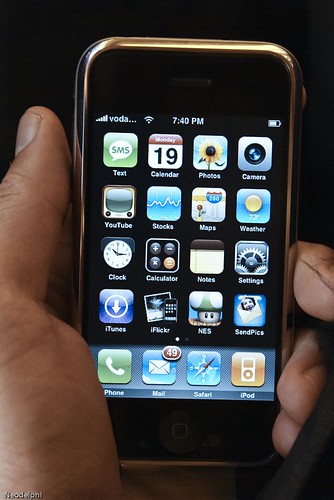
iphone photo by neodelphi on flickr
photo by tow_adam on flickr


Tuesday, July 29, 2008

Children Connecting


JIM CARLETON AND MALI BICKLEY
Presentation at
NECC 2008, San Antonio

We are entering "The World is Flat" era of education.
How can we inform, enlighten, and connect our children across time and space?

Jim and Mali shared the numerous collaborative projects in which they have involved their students.


photo on flickr by carf
GLOBAL MURAL PAINTING PROJECT

MY HERO
– A project promoting positive role models- myhero.com
ONE DREAM – A project to develop the relationship between two classes
• School wide collaboration website project
• Idea to help another school across the world- war affected students of Sierra Leone
• Raised funds to purchase technology to ship to them
• Then ask them to document the growth of the community

ART MILES PROJECT
• Creation of 1/ 2 mural by each culture send the 1/2 mural
• The other country paints the second half (based on Paper Bag Princess and the second 1/2 on a different story)
• Mural travels to art museums around the world

ZERO FOOTPRINT KIDS CALCULATOR - New project through iEARN about global warming

Lets the kids be the leaders and to take ownership of their learning.

We are crossing the line in the way students learn and need to adopt the way they learn out of school. We need to help them use these tools safely, confidently.

Engage students in real projects that make a difference in the world.

Having live interactive communication is vital!

By connecting the students with others across the world, they find a way in to understand current events and then want to learn and understand more.

Goals drive the tools.
It is about the connections and making the relationships.

The traits within Commit to Character were being developed through the collaborative projects. The traits became action words for them, changing who the students are. The words are who the children are becoming.

Collaborating across the world also increased collaboration within the school.
• Through collaboration the curriculum was developed in a meaningful connected way.
• Over a five-year period the test scores rose over 20% across the board.

Yes, there can be difficulties along the way.
Partners in other countries fell apart. Time zone differences can be difficult to negotiate around. And at times there were tech problems. Communication between IT and ICT is key.

Words of Advice and a Call to Action
• Take steps to take to begin
• Be willing to take a risk
• Follow your passion
• Collaborate, collaborate
• Please ask for help
• Work together
• Don't wait until you think you know what you want to do and know how to do it
• Your students and others will help you along the way
• Dream BIG
• Impact your student and the rest of the world


What kind of world do you want to live in?

Convene, Connect, Transform


Ideas presented by CEO of ISTE Don Knecek
at NECC2008, San Antonio


We need to transform schools into global learning portals

ISTE could stand for the
International
Society for
Transforming
Education

• Schools can't continue as if the world hasn’t
changed and that there is a globalization of
economy
• Imperative for all to think and innovate
• Whole new meaning to competitiveness
• Sprinkling of tech literacy is no longer enough
• Command digital environment
• Collaborate and communicate
• Innovate projects and solutions
• Be co-learners with students and colleagues
• Learning with and from students is imperative
• Teachers come from all over the world- virtually and literally
• Teaching and learning as isolated endeavors is no longer

We are entering "The World is Flat" era of education.

We must build capacity for transformation
and
build Rigor, Relevance, and Relationships in education,
across stakeholder groups
and up and down levels.